
Six Months of IPTV Finland
Review the half-year term, household connection needs and total price before making a longer commitment.
A six-month subscription is a longer commitment for a viewing setup you expect to keep using. It is worth checking the player and the content you need before choosing this term, especially if a TV replacement or move is planned.
Plan for the household you will have
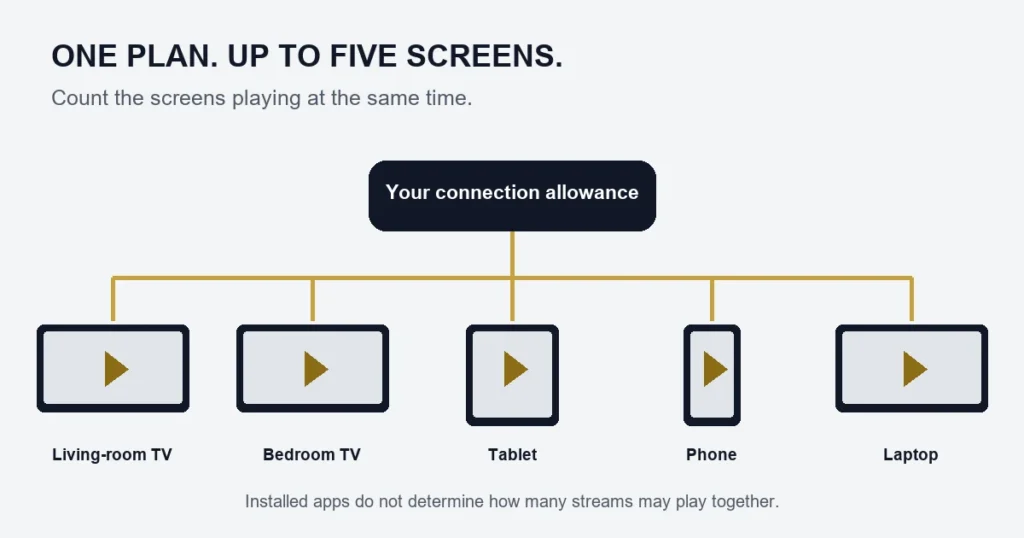
Count the screens likely to run together on a busy evening. Installing a player in a bedroom and on a phone does not require extra connections if only one is playing, but separate simultaneous programmes do. Do not choose the allowance solely from today’s viewing if another regular viewer will join soon.
Separate access from equipment changes
A new device may require a different app edition or player licence. The streaming term and the player activation are separate questions. Save your account details privately and check the replacement device before discarding the old setup.
For one connection, the term totals are €39.99 Standard and €49.99 Premium. Review the tier differences as well as the duration. The twelve-month option is a larger commitment; its lower monthly equivalent is not a guarantee that your preferred content will remain unchanged.
Full term totals by connection count
| Connections | Standard | Premium |
|---|---|---|
| 1 | €39.99 | €49.99 |
| 2 | €59.99 | €79.99 |
| 3 | €79.99 | €99.99 |
| 4 | €99.99 | €119.99 |
| 5 | €119.99 | €139.99 |
View all plans ? Connection guide
Check whether the setup is settled enough for half a year
A six-month choice is easier to assess when the main television and player are already familiar. You should know how to select the account, find the programmes you use and stop playback. If those basics are still uncertain, resolve them before making the length of the term the main focus.
Consider the equipment you expect to keep using. A planned move or replacement television may introduce a different app store, remote or network arrangement. The subscription duration does not remove those compatibility questions.
Compare the commitment with shorter options
A lower monthly equivalent reflects division of the term total, not a separate monthly payment schedule. Compare the full six-month amount with the shorter term you would otherwise choose. Use the same tier and connection count so the comparison is meaningful.
The three-month option can help frame a shorter commitment. The twelve-month guide covers the longest current choice. Neither comparison should replace reading the conditions that apply to the actual purchase.
Plan for changes in household viewing
Ask who is likely to watch simultaneously through the next several months. A new regular viewer can matter more than adding a spare device. Conversely, buying a second television does not necessarily increase overlap if the household still watches only one programme at a time.
Use the connection examples to select the allowance. Confirm how the chosen access will be supplied, and do not assume that purchasing another single-screen plan later will merge with the existing one.
Keep content expectations specific
Catalogue size describes the advertised tier, not a guarantee that a favourite title or channel edition remains unchanged for the whole term. If you need a particular Finnish programme, ask about the exact channel, language and viewing route before buying.
For movies and series, note the title year, season and episode. For sports, name the event and date. The sports checklist is useful when a long subscription decision is being driven by one tournament or broadcast.
Do not confuse player activation with subscription duration
A player can remain installed while streaming access has its own term. The Premium player benefit does not turn a six-month television subscription into lifetime service. Read the Premium feature explanation and confirm the applicable app before paying for another licence.
Make future troubleshooting easier
- Record the device model and player edition after successful setup.
- Keep the order reference and selected plan details.
- Store access credentials privately.
- Note significant equipment or app changes when they occur.
- When a problem starts, describe the first failed step and whether other sources work.
This does not require logging every programme you watch. A small setup record is enough to avoid guessing later whether the player or device changed. It is especially helpful if several people use different screens.
Before replacing a working player
Identify the reason for the change. If the guide is shifted but playback works, the EPG checks may be the right first step. If only one title fails, record that title. Reinstalling everything can remove working settings without addressing the actual source of the problem.
When a replacement is necessary, check its official listing and supported login method. Do not assume an app with a familiar name is the same publisher or edition. The player guide explains the relevant distinctions.
Six-month questions
Can I automatically upgrade an existing short plan?
No automatic conversion is promised by this page. Ask about the available change before placing another order and include the existing reference.
Does the term guarantee a fixed catalogue?
No permanent title-by-title guarantee is made here. Check the content that matters to you and read the published conditions rather than extrapolating from headline numbers.
What if my home internet changes?
Keep the account and player instructions, then assess the new connection on the actual device. A different network can introduce a different symptom, so record what works and what fails instead of immediately changing the subscription.
Is six months suitable for an untested television?
Resolve compatibility first. The free-test information explains how a one-connection check can help assess the setup, while making clear that it does not prove every future use case.
When should I decide whether to continue?
Review the supplied access information and plan your enquiry before you need continuity. This page does not promise automatic renewal. Keep the order reference available and ask about the next step rather than assuming a new purchase will attach itself to the existing account.
Plan an equipment handover carefully
If a television replacement is likely during the next six months, keep the working player details before removing the old equipment. Identify the new platform and check its store listing, login method and licence requirements independently. Do not assume that a subscription term transfers an app registration between unrelated devices. Arrange the new setup while the old information is still available, and test one screen at a time according to the supplied allowance. This makes the handover a compatibility task with clear inputs rather than an urgent search for forgotten credentials after the previous television and its saved configuration are gone.
What should I keep if someone else manages installation?
Ask for a short private record of the device, player edition and supported access method, together with your order reference. Make sure you can open the saved account and stop playback yourself. Keep credentials securely rather than relying on an installer’s public notes or screenshots. This gives you continuity if help is needed months later, while leaving the actual account terms unchanged. A longer subscription is easier to manage when its working setup can be identified without depending on someone remembering the original installation.